Feature Launch
Personalize Your Favicon and Browser Title on Your Love Website
Make your couple website feel yours from the very first browser tab
The Love-Builder Team·August 6, 2026·4 min read
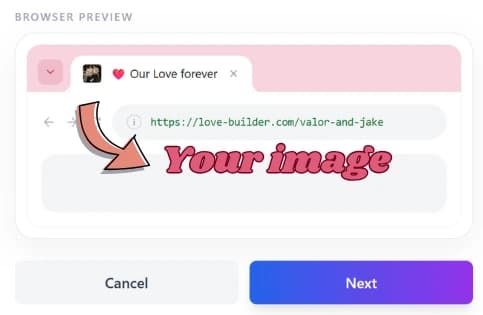
Your love website already holds your photos, notes, and story. Now it can feel personal one step earlier: in the browser tab itself. You can set a custom browser title and upload your own favicon — a couple photo, a tiny heart, your initials — so when someone opens your link, the tab already feels like it belongs to the two of you.
Replace the default tab title with something personal, like your names or a private nickname.
Why the browser tab matters more than you think
Most romantic websites focus on what happens after someone lands on the page. The tab is the first impression — and for a surprise gift, that tiny moment counts. Seeing a custom title and a familiar little icon instead of a generic label makes the open feel intentional before the hero even loads.
What you can personalize
Choose a browser title up to 60 characters — short enough to read in a tab, specific enough to feel like yours. Then upload an image for your favicon. Love Builder prepares it for the tab so it stays crisp and lightweight. You can set both when you pick your love link at checkout, or change them later from your dashboard under your site settings.
Ideas that feel especially personal
Try titles like "For Alex, forever," "Our little corner," or just your names together. For the favicon, a cropped couple photo, a wedding detail, a pet, or a simple monogram all work beautifully. The best choices are small, clear, and instantly recognizable at favicon size.
How to set it up in Love Builder
When you publish, you will see a live browser-style preview while choosing your link — title text and favicon included — so you know exactly how the tab will look. Already published? Open your dashboard, update your browser tab look, and save. Your public love site picks up the new title and icon right away.
The Love-Builder Team
Love Builder Editorial Team